Code Generator
Overview
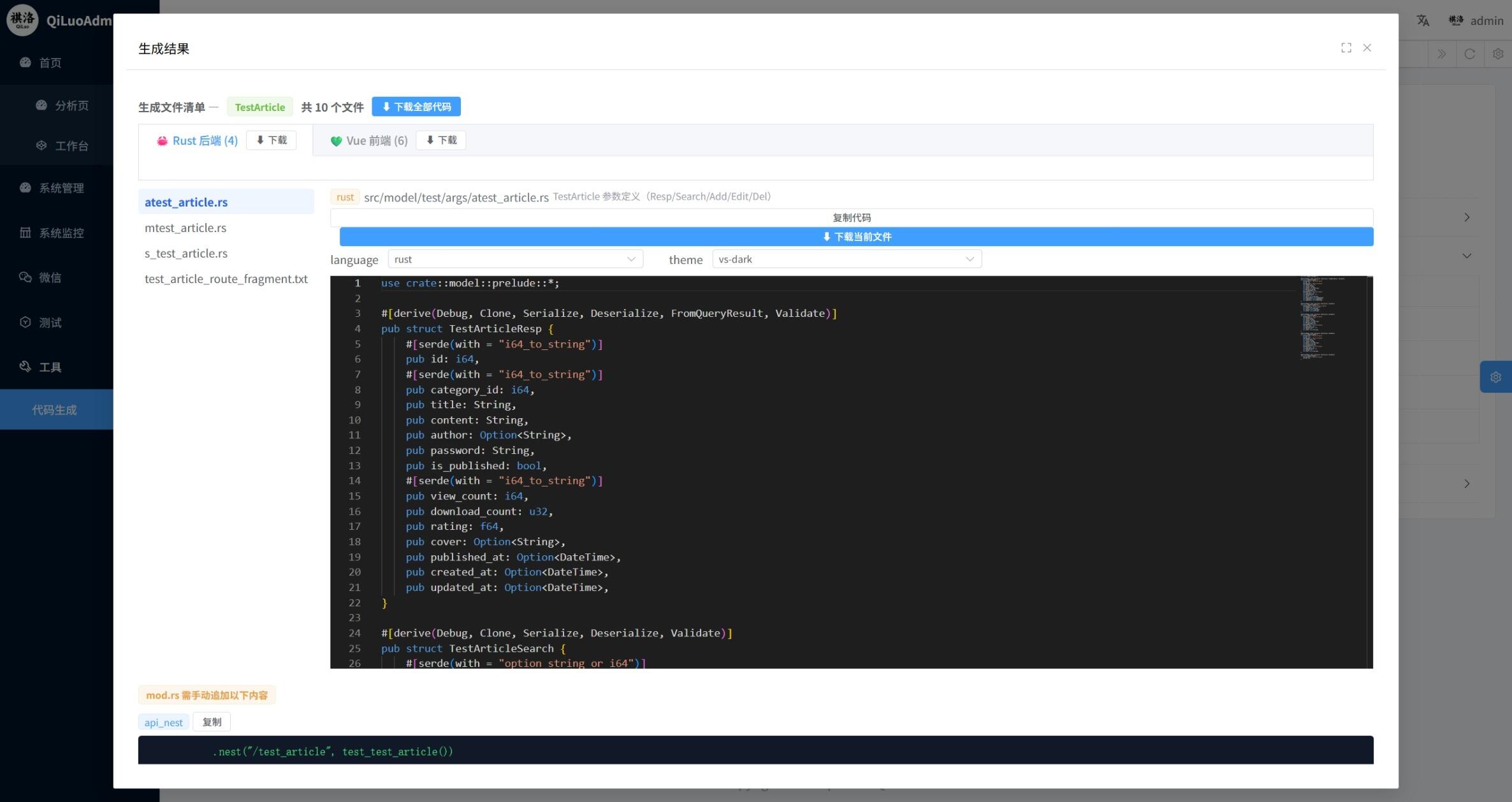
QiLuo includes a built-in Code Generator that scans Entity files generated by sea-orm-cli and automatically produces complete backend and frontend CRUD code, dramatically reducing repetitive work.
Core Capabilities:
- 🦀 Backend Generation: Args definitions, Model database operations, Service route handlers, API route fragments, mod.rs declarations
- 🖥️ Frontend Generation: API request wrappers, list View page, Write form component, Detail display component, i18n translation snippets
- ⚙️ Field Configuration: Visual configuration of field visibility in list/search/form/detail, sorting, component types, validation rules
- 🔗 Relations: Auto-detects BelongsTo relations, generates Select dropdowns and associated data loading code
- 🔒 Data Scope: Detects
dept_id+owner_idfields, enables data isolation with one click - 📤 Upload Component: Auto-detects image fields, generates Upload components and upload handling code
Quick Start
Prerequisites
- Generate Entity files using
sea-orm-cli generate entity(located insrc/model/{module}/entity/) - Ensure the backend service is running (the code generator calls backend scan/generate APIs)
Steps
- Log into the admin panel, navigate to Tools → Code Generator
- Click the Scan button to scan all module Entity files
- Find the target entity in the scan results, click the Config button
- Adjust field display, components, validation, etc. in the configuration dialog
- Click Confirm Generate to view the generated code
- Download or copy the generated code and place it in the corresponding project directories
Generated Files
Backend Files (Rust)
| # | File | Path Template | Description |
|---|---|---|---|
| 1 | Args | src/model/{module}/args/{entity}.rs | Parameter definitions: Resp / Search / Add / Edit / Del |
| 2 | Model | src/model/{module}/model/{entity}.rs | Database operations: list / add / edit / del |
| 3 | Service | src/service/{module}/{entity}.rs | Route handler functions |
| 4 | API Route Fragment | src/api/{table}_route_fragment.txt | Route registration function fragment (manual merge required) |
| 5 | API Nest Fragment | mod_updates | .nest() route mounting fragment (manual merge required) |
| 6 | mod Declaration | mod_updates | pub mod declarations for model/args/service (manual merge required) |
Frontend Files (Vue/TypeScript)
| # | File | Path Template | Description |
|---|---|---|---|
| 7 | API | src/api/{module}.ts | API request wrapper (list/add/edit/del) |
| 8 | View | src/views/{Module}/{entity}/{entity}.vue | List page (with search, table, dialog) |
| 9 | Write | src/views/{Module}/{entity}/components/Write.vue | Form component (add/edit) |
| 10 | Detail | src/views/{Module}/{entity}/components/Detail.vue | Detail display component |
| 11 | Chinese i18n | src/locales/menuuser.zh-CN.snippet.json | Chinese translation snippet (merge into locale file) |
| 12 | English i18n | src/locales/menuuser.en.snippet.json | English translation snippet (merge into locale file) |
Field Configuration
The code generator configuration dialog includes four tabs:
📋 List Configuration
Controls field display behavior in the list page:
| Setting | Description | Default |
|---|---|---|
| Show | Whether to display in table column | Non-primary key fields default to shown |
| Sortable | Whether to support click-to-sort | Default off |
| Sort Priority | Sort weight; higher value = higher priority | 0 (not in default sort) |
| Sort Direction | Ascending asc or descending desc | desc |
Default Sort Rules:
sort/order_num/sort_orderfields: highest priority, directionascweight/priorityfields: second priority, directiondesc- Other fields: no default sort, configured manually by user
🔍 Search Configuration
| Setting | Description | Default |
|---|---|---|
| Search | Whether to use as a search condition | Default off |
| Component | Component type for search form | Auto-inferred |
Search fields only apply to String / Option<String> types. String searches use contains (fuzzy match), other types use eq (exact match).
📝 Form Configuration
| Setting | Description | Default |
|---|---|---|
| Form | Whether to show in add/edit form | Non-primary key fields default to shown |
| Component | Component type for form | Auto-inferred |
| Required | Whether the field is required | Non-optional fields default to required |
| Min Length | String minimum length validation | — |
| Max Length | String maximum length validation | — |
| Pattern | Regex pattern validation | — |
| Pattern Message | Regex validation failure message | — |
📖 Detail Configuration
| Setting | Description | Default |
|---|---|---|
| Detail | Whether to show on detail page | Default shown |
Component Type Inference
The code generator automatically infers frontend components based on field names and Rust types:
| Inference Rule | Component | Example Fields |
|---|---|---|
Field name ends with _at or created_at / updated_at | DatePicker | created_at |
Field name contains image / img / avatar / cover / pic / photo / thumbnail | Upload | cover, avatar |
Field name is password | InputPassword | password |
Field name ends with _id (foreign key) | Select | role_id, dept_id |
Field name is status / type / kind / category / level, etc. | Select | status, type |
Field name is gender / sex | Radio | sex |
Field name is sort / weight / priority, etc. | InputNumber | sort_order |
Rust type i32 / u32 / f32 / f64 | InputNumber | — |
Rust type i64 / u64 | Input | — |
Rust type bool | Switch | — |
Rust type String and field name contains remark / content / description | InputTextarea | remark |
Rust type String | Input | — |
Rust type DateTime, etc. | DatePicker | — |
Supported component types (selectable in configuration):
| Component | Description |
|---|---|
| Input | Text input |
| InputNumber | Number input |
| Select | Dropdown select |
| Radio | Radio button |
| Checkbox | Checkbox |
| Switch | Switch toggle |
| InputPassword | Password input |
| DatePicker | Date picker |
| TimePicker | Time picker |
| DateTimePicker | Date-time picker |
| Upload | File upload |
| Textarea | Textarea |
Relation Handling
BelongsTo Relations
When an Entity defines a BelongsTo relation (e.g., foreign key role_id referencing sys_role), the code generator will:
- Auto-detect: Parse the Entity's
Relationenum to extractBelongsTorelation info - Component inference: Automatically set the foreign key field component to
Select - Generate relation API calls: Auto-generate list requests for the related table in the View
- Generate dropdown loading: Auto-load Select options from the related table in
Write.vue - Display field inference: Auto-infer the display field based on the target table name (e.g.,
sys_role→role_name,sys_dict_type→dict_name)
Inference rule examples:
| Target Table | Inferred Display Field |
|---|---|
sys_role | role_name |
sys_dict_type | dict_name |
sys_dept | dept_name |
sys_user | username |
| Other | {target}_name |
In the field configuration, you can manually override relation_target and relation_display_field.
Data Scope
When an entity contains both dept_id and owner_id fields, the code generator auto-detects and provides a Data Isolation toggle:
- When enabled, it generates code using
TEMPLATE_MODEL_DATA_SCOPEandTEMPLATE_SERVICE_DATA_SCOPEtemplates - Model layer
list/add/edit/deloperations automatically inject department permission filtering - Service layer passes
UserInfofor permission verification
Upload Component
When a field name contains image-related keywords (image / img / avatar / cover / pic / photo / thumbnail):
- Write.vue auto-generates Upload component configuration
- Auto-imports
ElMessageanduseUserStore - Auto-generates upload-related
watchandsubmithandling code - View.vue list page uses
ElImagecomponent for image field thumbnail display
i18n Translations
The code generator auto-generates Chinese and English translation snippets for each entity, including labels for all fields:
- Chinese: Auto-infers Chinese labels (e.g.,
dict_name→字典名称,created_at→创建时间) - English: Auto-infers English labels (e.g.,
dict_name→Dict Name,created_at→Created At)
Generated translation snippets need to be manually merged into the language files under src/locales/.
Common field Chinese label inference:
| Field Pattern | Chinese Label |
|---|---|
id | ID |
name / *_name | 名称 |
title / *_title | 标题 |
status / *_status | 状态 |
sort / *_sort | 排序 |
remark / *_remark | 备注 |
created_at | 创建时间 |
updated_at | 更新时间 |
dept_id | 部门 |
owner_id | 所有者 |
cover / image / avatar | 封面/图片/头像 |
Code Merge Guide
After generating code, you need to manually merge the following into the project:
1. Backend mod.rs Declarations
Add declarations from mod_updates to the corresponding mod.rs files:
// src/model/{module}/args/mod.rs
pub mod {entity};

// src/model/{module}/model/mod.rs
pub mod {entity};

// src/service/{module}.rs
pub mod {entity};
2. API Route Registration
Merge route function and nest fragments into src/api/{module}.rs:
// Route function
fn {module}_{entity}(router: Router) -> Router {
    router
        .route("/list", WebPathType::Get, Some("List {model_name}"), get({service}::list))
        .route("/edit", WebPathType::Put, Some("Edit {model_name}"), put({service}::edit))
        .route("/add", WebPathType::Post, Some("Add {model_name}"), post({service}::add))
        .route("/del", WebPathType::Delete, Some("Delete {model_name}"), delete({service}::delete))
}

// Nest registration
.nest("/{entity}", {module}_{entity}(Router::new()))
3. Frontend i18n
Merge translation snippets into the menuuser object in src/locales/zh-CN.ts and src/en.ts.
4. Service File Note
If a Service file already exists (may contain hand-written route functions), the code generator will skip it to avoid overwriting custom code.
Configuration Persistence
Field configuration can be saved to the backend. When you click Confirm Generate, the current configuration is automatically saved. Next time you open the configuration dialog for the same entity, the saved configuration will be auto-loaded.
Save API: SaveFieldConfig, Load API: LoadFieldConfig, keyed by module_name + table_name.
Backend Architecture
The code generator backend core is located in src/common/codegen/:
| File | Description |
|---|---|
mod.rs | Module entry |
parser.rs | Entity parser — parses SeaORM Entity files, extracts field info and relations |
generator.rs | Code generation engine — builds template context, renders all templates |
templates.rs | Backend inline templates (Args, Model, Service, API routes, etc.) |
tera_templates/ | Frontend Tera template directory |
Core Data Structures:
// Entity information
pub struct EntityInfo {
    pub table_name: String,       // Table name, e.g., test_api
    pub module_name: String,      // Module name, e.g., test
    pub model_name: String,       // PascalCase name, e.g., TestApi
    pub primary_key: String,      // Primary key field name
    pub fields: Vec<FieldInfo>,   // All fields
    pub searchable_fields: Vec<FieldInfo>,  // Searchable fields
    pub list_fields: Vec<FieldInfo>,        // List display fields
    pub form_fields: Vec<FieldInfo>,        // Form fields
    pub detail_fields: Vec<FieldInfo>,      // Detail page fields
    pub relations: Vec<RelationInfo>,       // Relations
    pub belongs_to_fields: Vec<FieldInfo>,  // BelongsTo fields
    pub has_data_scope: bool,               // Whether data scope is supported
}

// Field information
pub struct FieldInfo {
    pub name: String,              // snake_case field name
    pub rust_type: String,         // Rust type
    pub is_primary_key: bool,      // Is primary key
    pub is_optional: bool,         // Is Optional
    pub frontend_component: String, // Inferred frontend component
    pub show_in_list: bool,        // Show in list
    pub show_in_search: bool,      // Show in search
    pub show_in_form: bool,        // Show in form
    pub sortable: bool,            // Is sortable
    pub relation: Option<RelationInfo>, // Relation info
}

// Field configuration (user-defined)
pub struct FieldConfig {
    pub field_name: String,
    pub show_in_list: bool,
    pub show_in_search: bool,
    pub show_in_form: bool,
    pub show_in_detail: bool,
    pub component: Option<String>,     // Override component type
    pub sortable: Option<bool>,
    pub sort_priority: Option<i32>,
    pub sort_order: Option<String>,
    pub label: Option<String>,         // Override translation label
    pub required: Option<bool>,
    pub min_length: Option<i32>,
    pub max_length: Option<i32>,
    pub pattern: Option<String>,
    pub pattern_message: Option<String>,
    pub relation_target: Option<String>,
    pub relation_display_field: Option<String>,
}
FAQ
Q: Scan results are empty?
Make sure you've run sea-orm-cli generate entity and Entity files are in src/model/{module}/entity/.
Q: Generated Service file was skipped?
If a Service file already exists, the code generator won't overwrite it to avoid losing hand-written route code. To regenerate, back up and delete the old file first.
Q: How to customize component types?
In the field configuration dialog, switch to the Form Configuration or Search Configuration tab, and select the desired component from the "Component" dropdown.
Q: How to add form validation?
In the Form Configuration tab, you can set required, min/max length, regex pattern, and other validation rules. The generated Write.vue will automatically include corresponding Element Plus form validation rules.
Q: Relation dropdown options are empty?
Verify that the related table's API route is properly registered and the relation_display_field is correctly configured.
Q: How to enable data scope?
When an entity contains both dept_id and owner_id fields, a "Data Isolation" toggle appears at the top of the configuration dialog. When enabled, the generated Model and Service code will automatically include data permission filtering logic.